AWS Certification Guide 2026: Everything You Need to Know to Get Certified
Cloud computing is the fastest-growing sector in tech — and AWS certifications are the gold standard for proving your cloud skills. With over 1.5 million certified AWS professionals worldwide, an AWS credential on your resume signals to employers that you’re serious, skilled, and ready to deliver.
But with 12 active certifications spread across four difficulty levels and multiple specialty tracks, knowing where to start and how to prepare can be confusing.
This complete AWS certification guide covers everything: every exam, what it tests, who it’s for, how much it costs, how to prepare, and exactly which cert to pursue based on your career goals.
Let’s get started.
1. Why Get AWS Certified in 2026? {#why-get-certified}
The cloud computing market is projected to exceed $1 trillion by 2028, and AWS holds the largest share with more than 200 services used by millions of customers globally. Demand for certified cloud professionals has never been higher — and the data backs this up.
The Business Case for AWS Certification
For Job Seekers:
- AWS certifications appear in more job postings than any other cloud credential
- Certified professionals earn an average of 26% more than their non-certified peers
- Cloud roles consistently rank among the top 10 highest-paying IT positions
- AWS certifications are recognized in 190+ countries worldwide
For Current Professionals:
- Validates expertise and accelerates promotion opportunities
- Demonstrates commitment to continuous learning
- Opens doors to specialized, higher-paying cloud roles
- Helps employers justify investing in your development
For Organizations:
- AWS Partner Network (APN) requires certified employees to maintain tier status
- Certified teams deploy faster, make fewer architecture mistakes, and reduce costs
- AWS credits and benefits are partly tied to the number of certified professionals on staff
For Career Changers:
- A clear, achievable path from zero cloud knowledge to job-ready in 3–6 months
- Certifications signal competence when you lack years of AWS experience
- Cloud roles are highly remote-friendly and globally in demand
AWS Certification Stats You Should Know (2025)
| Metric | Data |
|---|---|
| Active AWS certifications available | 12 |
| Certified professionals worldwide | 1.5M+ |
| Average salary increase post-certification | 26% |
| Cloud Practitioner pass rate (estimated) | ~70% |
| Solutions Architect – Associate pass rate | ~60% |
| Job postings requiring AWS skills (US, 2024) | 100,000+ |
2. The Complete AWS Certification Roadmap {#roadmap}
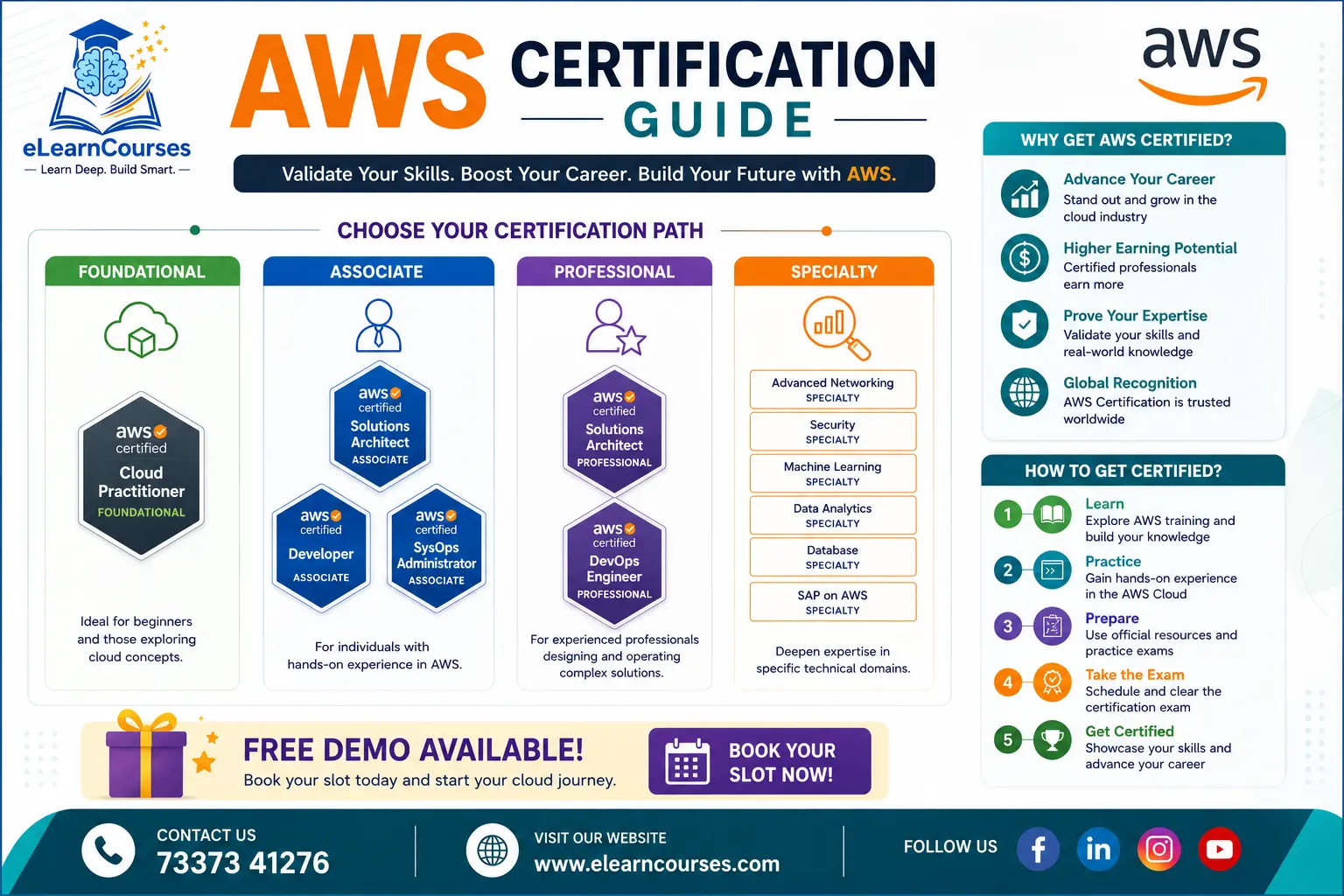
AWS structures its certifications into four tiers, designed to take you from cloud newcomer to deep specialist:
┌─────────────────────────────────────────────────────────────────┐
│                     SPECIALTY (6 Certs)                         │
│  ML  │  Security  │  Database  │  Analytics  │  Networking  │  SAP│
├──────────────────────┬──────────────────────────────────────────┤
│  PROFESSIONAL (2)    │  Solutions Architect Pro  │  DevOps Pro  │
├──────────────────────┴──────────────────────────────────────────┤
│               ASSOCIATE (3 Certs)                               │
│   Solutions Architect  │  Developer  │  SysOps Administrator    │
├─────────────────────────────────────────────────────────────────┤
│               FOUNDATIONAL (1 Cert)                             │
│                  Cloud Practitioner                             │
└─────────────────────────────────────────────────────────────────┘
Recommended Starting Points by Background
| Your Background | Recommended First Cert | Then Progress To |
|---|---|---|
| No tech background | Cloud Practitioner | Solutions Architect Associate |
| IT / sysadmin | Cloud Practitioner (optional) | Solutions Architect Associate |
| Software developer | Cloud Practitioner (optional) | Developer Associate |
| DevOps engineer | Solutions Architect Associate | DevOps Professional |
| Data engineer | Solutions Architect Associate | Data Analytics Specialty |
| Security professional | Solutions Architect Associate | Security Specialty |
| Manager / decision-maker | Cloud Practitioner | — |
3. Foundational Level: AWS Certified Cloud Practitioner {#cloud-practitioner}
AWS Certified Cloud Practitioner (CLF-C02)
Level: Foundational Recommended Experience: None — truly beginner-friendly Exam Duration: 90 minutes Questions: 65 (multiple choice and multiple response) Passing Score: 700/1000 Cost: $100 USD Validity: 3 years
What It Tests
The Cloud Practitioner exam validates a broad, high-level understanding of AWS Cloud. It does NOT test technical implementation skills — it tests conceptual understanding.
Domain breakdown:
| Domain | Weight |
|---|---|
| Cloud Concepts | 24% |
| Security and Compliance | 30% |
| Cloud Technology and Services | 34% |
| Billing, Pricing, and Support | 12% |
Key Topics to Study
- Cloud computing concepts: IaaS, PaaS, SaaS, and the 6 advantages of cloud
- AWS global infrastructure: regions, availability zones, edge locations
- Core AWS services: EC2, S3, RDS, Lambda, VPC, IAM, CloudFront
- AWS Shared Responsibility Model (critical concept — always appears on the exam)
- IAM fundamentals: users, groups, roles, policies
- AWS pricing models: On-Demand, Reserved, Spot, Savings Plans
- AWS Support plans: Basic, Developer, Business, Enterprise
- AWS Well-Architected Framework (six pillars)
- AWS compliance programs and certifications
Who Should Take It
The Cloud Practitioner is ideal for:
- Absolute beginners with no cloud experience
- Business stakeholders, project managers, and sales professionals working with cloud teams
- Students beginning a cloud computing career
- IT professionals pivoting to cloud who want a structured starting point
Is It Worth It?
The Cloud Practitioner is not required before taking Associate-level exams. Technically skilled professionals (developers, sysadmins) can skip straight to Associate level. However, it is recommended if you:
- Have zero prior cloud knowledge
- Work in a non-technical role but need cloud credibility
- Want an easy confidence boost and AWS exam familiarity before the harder exams
Preparation time: 4–8 weeks (studying 1–2 hours/day)
4. Associate Level Certifications {#associate}
Associate certifications are the sweet spot for most cloud professionals — they’re challenging enough to be respected by employers, yet achievable without years of experience.
AWS Certified Solutions Architect – Associate (SAA-C03)
The most popular AWS certification in the world.
Level: Associate Recommended Experience: 1+ year of hands-on AWS experience (or equivalent study) Exam Duration: 130 minutes Questions: 65 Passing Score: 720/1000 Cost: $150 USD Validity: 3 years
What It Tests
The SAA-C03 tests your ability to design resilient, high-performing, secure, and cost-optimized architectures on AWS. This is a scenario-based exam — you’re given architectural challenges and must identify the best AWS solution.
Domain breakdown:
| Domain | Weight |
|---|---|
| Design Secure Architectures | 30% |
| Design Resilient Architectures | 26% |
| Design High-Performing Architectures | 24% |
| Design Cost-Optimized Architectures | 20% |
Key Topics to Study
- EC2 (instance types, purchasing options, Auto Scaling, placement groups)
- S3 (storage classes, lifecycle policies, replication, encryption, website hosting)
- VPC (subnets, route tables, security groups, NACLs, VPC peering, NAT Gateway)
- RDS, Aurora, DynamoDB, ElastiCache (when to use each)
- IAM (policies, roles, cross-account access, STS)
- Lambda, API Gateway, SQS, SNS, EventBridge (serverless and decoupling)
- CloudFront, Route 53 routing policies, Global Accelerator
- ECS, EKS, Fargate (containerization)
- EBS, EFS, FSx, Storage Gateway (storage selection)
- High availability and fault tolerance patterns
- Cost optimization strategies (Reserved Instances, Spot, rightsizing)
Who Should Take It
- Aspiring cloud architects and solutions architects
- Backend developers moving into cloud infrastructure
- DevOps and IT professionals building AWS environments
- Anyone wanting the most recognized AWS credential for job applications
Preparation time: 8–12 weeks (studying 1–2 hours/day)
AWS Certified Developer – Associate (DVA-C02)
Level: Associate Recommended Experience: 1+ year developing and maintaining AWS-based applications Exam Duration: 130 minutes Questions: 65 Passing Score: 720/1000 Cost: $150 USD Validity: 3 years
What It Tests
This exam focuses on developing, deploying, and debugging cloud-native applications on AWS. It’s heavier on coding, SDKs, and developer tools than the Solutions Architect exam.
Domain breakdown:
| Domain | Weight |
|---|---|
| Development with AWS Services | 32% |
| Security | 26% |
| Deployment | 24% |
| Troubleshooting and Optimization | 18% |
Key Topics to Study
- AWS SDK, CLI, and API interactions
- Lambda (advanced): layers, environment variables, versions, aliases, concurrency
- API Gateway: mapping templates, stages, throttling, authentication
- DynamoDB: data modeling, GSI/LSI, streams, transactions, DAX
- S3: pre-signed URLs, multipart uploads, event notifications
- SQS and SNS: dead letter queues, message visibility, FIFO
- Elastic Beanstalk: deployment policies, .ebextensions
- CodeCommit, CodeBuild, CodeDeploy, CodePipeline (CI/CD workflow)
- CloudWatch: custom metrics, logs, alarms
- X-Ray: distributed tracing and debugging
- Cognito: user pools, identity pools, JWT tokens
- Secrets Manager and SSM Parameter Store
- Step Functions: state machine design
Who Should Take It
- Software developers working with AWS
- Backend engineers building serverless applications
- Full-stack developers adding cloud skills to their toolkit
- Anyone pursuing the DevOps Engineer Professional path
Preparation time: 8–12 weeks
AWS Certified SysOps Administrator – Associate (SOA-C02)
Level: Associate Recommended Experience: 1+ year of hands-on AWS systems administration Exam Duration: 180 minutes Questions: 65 (includes exam lab — hands-on console tasks) Passing Score: 720/1000 Cost: $150 USD Validity: 3 years
What It Tests
The SysOps exam is the most operationally focused Associate cert. It tests real-world skills for deploying, managing, and operating workloads — with an actual hands-on lab component (unique among Associate certs).
Domain breakdown:
| Domain | Weight |
|---|---|
| Monitoring, Logging, and Remediation | 20% |
| Reliability and Business Continuity | 16% |
| Deployment, Provisioning, and Automation | 18% |
| Security and Compliance | 16% |
| Networking and Content Delivery | 18% |
| Cost and Performance Optimization | 12% |
Key Topics to Study
- CloudWatch: detailed monitoring, log groups, metric filters, dashboards
- CloudTrail: trail configuration, event history, integration with CloudWatch
- AWS Config: rules, conformance packs, remediation
- Systems Manager: Patch Manager, Run Command, Session Manager, Parameter Store
- EC2: AMIs, snapshots, instance lifecycle, status checks
- Auto Scaling: lifecycle hooks, scaling policies, warm pools
- VPC: VPN, Direct Connect, Transit Gateway, PrivateLink
- S3: Cross-Region Replication, Object Lock, Access Points
- RDS: Multi-AZ, automated backups, snapshot restore, Performance Insights
- CloudFormation: StackSets, drift detection, rollback triggers
- Organizations: SCPs, consolidated billing, AWS Control Tower
Who Should Take It
- Systems administrators managing AWS environments
- Cloud operations engineers
- IT professionals transitioning from on-premises ops to cloud
- Those pursuing the DevOps Engineer Professional path (SysOps + Developer Associate combo is ideal)
Preparation time: 10–14 weeks (the lab component requires genuine hands-on practice)
Also Read : Top AWS Services Explained
5. Professional Level Certifications {#professional}
Professional certifications are the hardest in the AWS catalog — they require deep breadth and depth across the full AWS platform. They’re for experienced practitioners, not beginners. AWS certified
AWS Certified Solutions Architect – Professional (SAP-C02)
Level: Professional Prerequisites: Recommended (not required): Solutions Architect Associate Recommended Experience: 2+ years designing AWS solutions Exam Duration: 180 minutes Questions: 75 Passing Score: 750/1000 Cost: $300 USD Validity: 3 years
What It Tests
Complex, multi-service architecture scenarios at enterprise scale. Questions are long, nuanced, and test trade-off reasoning — not just AWS knowledge.
Key additional topics beyond Associate:
- Multi-account strategy with AWS Organizations, Landing Zone, Control Tower
- Network design: Transit Gateway, VPN, Direct Connect, hybrid architectures
- Migration strategies: 7Rs (Rehost, Replatform, Repurchase, Refactor, Retire, Retain, Relocate)
- Disaster recovery: RPO/RTO, backup/restore, pilot light, warm standby, multi-site active/active
- Cost optimization at scale: Savings Plans, rightsizing, reserved capacity planning
- Large-scale data architectures and analytics pipelines
- Security at scale: SCPs, permission boundaries, AWS SSO (IAM Identity Center)
Preparation time: 3–5 months beyond Associate level
AWS Certified DevOps Engineer – Professional (DOP-C02)
Level: Professional Prerequisites: Recommended: Developer Associate OR SysOps Associate Recommended Experience: 2+ years provisioning, operating, and managing AWS environments Exam Duration: 180 minutes Questions: 75 Passing Score: 750/1000 Cost: $300 USD Validity: 3 years
What It Tests
Domain breakdown:
| Domain | Weight |
|---|---|
| SDLC Automation | 22% |
| Configuration Management and IaC | 17% |
| Resilient Cloud Solutions | 15% |
| Monitoring and Logging | 15% |
| Incident and Event Response | 14% |
| Security and Compliance Automation | 17% |
Key topics:
- CodePipeline, CodeBuild, CodeDeploy, CodeCommit (deep expertise)
- CloudFormation: advanced templates, macros, custom resources, StackSets
- Elastic Beanstalk: advanced deployment strategies
- OpsWorks, Systems Manager at scale
- ECS/EKS deployment automation
- CloudWatch: advanced monitoring, anomaly detection, Contributor Insights
- Config Rules: custom Lambda-backed rules, automated remediation
- Security automation: GuardDuty, Security Hub, Macie, automated remediation
Preparation time: 3–5 months
6. Specialty Certifications {#specialty}
Specialty certifications validate deep expertise in a specific domain. They require strong foundational AWS knowledge and are ideal for experienced professionals looking to differentiate themselves.
| Certification | Code | Focus Area | Cost |
|---|---|---|---|
| AWS Certified Machine Learning – Specialty | MLS-C01 | ML/AI on AWS | $300 |
| AWS Certified Security – Specialty | SCS-C02 | Advanced security | $300 |
| AWS Certified Database – Specialty | DBS-C01 | Database design & migration | $300 |
| AWS Certified Data Analytics – Specialty | DAS-C01 | Big data & analytics | $300 |
| AWS Certified Advanced Networking – Specialty | ANS-C01 | Networking architecture | $300 |
| AWS Certified SAP on AWS – Specialty | PAS-C01 | Running SAP workloads | $300 |
Which Specialty Should You Pursue?
Machine Learning Specialty (MLS-C01) — Best for: Data scientists, ML engineers, AI developers. Tests SageMaker end-to-end, data engineering for ML, model selection, and evaluation. Fastest-growing demand.
Security Specialty (SCS-C02) — Best for: Security engineers, compliance professionals, cloud architects with a security focus. Deep dive into IAM, encryption, logging, incident response, and threat detection.
Data Analytics Specialty (DAS-C01) — Best for: Data engineers, analytics professionals, BI developers. Covers Kinesis, Glue, Redshift, Athena, EMR, QuickSight, Lake Formation.
Advanced Networking Specialty (ANS-C01) — Best for: Network engineers, solutions architects specializing in connectivity. The hardest specialty exam — covers BGP, Direct Connect design, Transit Gateway, DNS, and hybrid networking.
Database Specialty (DBS-C01) — Best for: DBAs and data architects migrating or optimizing databases on AWS. Covers all AWS database services, migration strategies with DMS, and performance tuning.
7. AWS Certification Exam Details & Costs {#exam-details}
Complete Exam Overview Table
| Certification | Code | Duration | Questions | Pass Score | Cost |
|---|---|---|---|---|---|
| Cloud Practitioner | CLF-C02 | 90 min | 65 | 700/1000 | $100 |
| Solutions Architect – Associate | SAA-C03 | 130 min | 65 | 720/1000 | $150 |
| Developer – Associate | DVA-C02 | 130 min | 65 | 720/1000 | $150 |
| SysOps Administrator – Associate | SOA-C02 | 180 min | 65 | 720/1000 | $150 |
| Solutions Architect – Professional | SAP-C02 | 180 min | 75 | 750/1000 | $300 |
| DevOps Engineer – Professional | DOP-C02 | 180 min | 75 | 750/1000 | $300 |
| ML Specialty | MLS-C01 | 180 min | 65 | 750/1000 | $300 |
| Security Specialty | SCS-C02 | 170 min | 65 | 750/1000 | $300 |
| Database Specialty | DBS-C01 | 180 min | 65 | 750/1000 | $300 |
| Data Analytics Specialty | DAS-C01 | 180 min | 65 | 750/1000 | $300 |
| Advanced Networking Specialty | ANS-C01 | 170 min | 65 | 750/1000 | $300 |
| SAP on AWS Specialty | PAS-C01 | 170 min | 65 | 750/1000 | $300 |
Testing Options
Pearson VUE Test Centers: Take the exam at an authorized testing center with in-person proctoring. Best if you have a noisy home environment or prefer the formal exam setting.
Online Proctored (At Home): Take the exam from your home or office with a remote proctor monitoring via webcam. Requires a quiet, private space and a stable internet connection.
Score Reporting
AWS exams use scaled scoring from 100–1000. You receive your score immediately after completing the exam. AWS does not disclose which specific questions you answered correctly, but you receive a performance summary by domain.
Retake Policy
- If you fail, you must wait 14 days before retesting
- There is no limit to the number of retake attempts
- You pay full price for each attempt
- After passing, you cannot retake the same version of the exam to improve your score
Discount Vouchers
- 50% discount voucher — awarded automatically when you pass any AWS certification, valid for your next exam
- AWS Partner discounts — employees of AWS Partner companies may receive additional discounts
- Training completion vouchers — available through AWS Skill Builder subscriptions and events
8. How to Choose the Right AWS Certification {#choose-cert}
Use this decision framework based on your specific situation:
By Career Goal
“I want to become a cloud architect” → Cloud Practitioner → Solutions Architect Associate → Solutions Architect Professional
“I want to be a cloud developer” → Cloud Practitioner (optional) → Developer Associate → DevOps Professional
“I work in IT operations and want to move to cloud” → Cloud Practitioner → SysOps Administrator Associate → DevOps Professional
“I want to specialize in AI/ML” → Solutions Architect Associate → Machine Learning Specialty
“I’m a DBA moving to cloud” → Cloud Practitioner → Solutions Architect Associate → Database Specialty
“I want the highest-paying cloud security role” → Solutions Architect Associate → Security Specialty
“I need a quick credential to start applying for jobs” → Cloud Practitioner (fastest) or Solutions Architect Associate (most valued)
By Time Available
| Time Available | Recommended Certification |
|---|---|
| 4–6 weeks | Cloud Practitioner |
| 2–3 months | Solutions Architect Associate |
| 3–4 months | Developer Associate or SysOps Associate |
| 6+ months | Professional or Specialty certs |
By Technical Background
Non-technical / Business roles: Cloud Practitioner only
Junior developer or IT: Cloud Practitioner → Solutions Architect Associate or Developer Associate
Senior developer / architect: Skip Cloud Practitioner → Solutions Architect Associate directly
DevOps / SRE: Solutions Architect Associate → DevOps Professional
9. AWS Certification Study Plan: Step-by-Step {#study-plan}
Here’s a proven study framework that works for all AWS certification levels:
Phase 1: Foundation (Weeks 1–2)
Goal: Build conceptual understanding before diving into details.
- Watch an overview course (video-based) to get the big picture
- Create a free AWS account and explore the console
- Read the official AWS exam guide (free download from AWS)
- Set up a study schedule: minimum 1–2 hours/day on weekdays
Key action: Map out all exam domains and assign study time proportionally based on their weights.
Phase 2: Deep Dive (Weeks 3–8 for Associate)
Goal: Master each exam domain with hands-on practice.
For each topic:
- Watch the video lesson
- Read the corresponding AWS documentation
- Practice in the AWS console or CLI
- Take notes in your own words (forces retention)
- Do practice questions on that topic immediately
Hands-on labs to prioritize (Solutions Architect Associate):
- Launch a multi-tier web app (EC2 + RDS + ALB)
- Configure VPC with public/private subnets and NAT Gateway
- Set up S3 static website hosting with CloudFront
- Create IAM roles and policies from scratch
- Deploy a Lambda function triggered by an S3 upload
- Configure Auto Scaling Group with load balancer
Phase 3: Practice Exams (Weeks 9–10)
Goal: Identify gaps and build exam stamina.
- Take a full practice exam under timed conditions
- Review every wrong answer — understand why it’s wrong, not just what’s right
- For questions you guessed correctly, verify your reasoning
- Focus additional study on domains where your score is below 75%
- Retake full practice exams until scoring 85%+ consistently
Pro tip: Aim for 85%+ on practice exams before sitting the real test. The actual exam is generally considered harder than most third-party practice exams.
Phase 4: Final Review (Days Before Exam)
Goal: Consolidate, don’t cram.
- Review your notes and flashcards — don’t learn new topics
- Revisit your weakest areas one more time
- Take a final practice exam 2–3 days before to confirm readiness
- Rest the night before — exam fatigue is real
- Confirm your testing setup (test center location or online proctoring requirements)
10. Top Study Resources for AWS Exams {#study-resources}
Structured Courses (Most Effective)
Structured video courses are the most efficient way to learn AWS systematically. A good course covers all exam domains, includes hands-on labs, and provides practice exams.
elearncourses.com offers comprehensive AWS certification courses covering all levels — from Cloud Practitioner to Specialty certs — with structured learning paths, practice exams, and hands-on labs designed specifically for the latest exam versions.
Official AWS Resources (Free)
| Resource | What It Is | Link |
|---|---|---|
| AWS Exam Guide | Official exam blueprint with domain weights | aws.amazon.com/certification |
| AWS Skill Builder | Free digital training from AWS | skillbuilder.aws |
| AWS Free Tier | Hands-on practice environment | aws.amazon.com/free |
| AWS Well-Architected Labs | Guided practical exercises | wellarchitectedlabs.com |
| AWS Documentation | Authoritative technical reference | docs.aws.amazon.com |
| AWS re:Post | Community Q&A | repost.aws |
Practice Exam Platforms
Taking high-quality practice exams is non-negotiable. You need a minimum of 200–300 practice questions per exam before test day.
What to look for in practice exams:
- Detailed explanations for correct AND incorrect answers
- Questions that match the current exam version (check the exam code)
- Domain-specific scoring so you can identify weak areas
- Timed full-length mock exams that simulate real conditions
Hands-On Practice Tips
AWS Free Tier — Your primary sandbox. The Free Tier covers the most important services:
- EC2: 750 hours/month of t2.micro or t3.micro
- S3: 5 GB storage
- RDS: 750 hours/month of db.t2/t3.micro
- Lambda: 1 million requests/month
- DynamoDB: 25 GB storage
Important: Always delete resources after practice to avoid unexpected charges. Set up a AWS Budget alert for $10/month to catch any accidental spend.
11. AWS Exam Day Tips & Strategies {#exam-tips}
Before the Exam
- Confirm your appointment 24–48 hours in advance
- For online proctored: test your system using the Pearson VUE system check tool
- Prepare valid government-issued photo ID
- Arrive at test center 15 minutes early (or log in 30 minutes early for online)
- No notes, books, or electronics allowed in the testing area
During the Exam
Time Management:
- Cloud Practitioner: ~83 seconds per question
- Associate level: ~120 seconds per question
- Professional level: ~144 seconds per question
Read Every Word: AWS exam questions are precisely worded. Words like “most cost-effective,” “least operational overhead,” “highly available,” and “fault tolerant” completely change the correct answer.
Flag and Move On: Don’t spend more than 2 minutes on a single question. Flag it, make your best guess, and come back.
Elimination Strategy: Typically 2 of 4 answers are clearly wrong. Eliminate those first, then compare the remaining two.
“Most” Questions: When asked for the “most” secure, cost-effective, or operationally efficient solution, compare your top two options carefully — the difference is often one specific feature.
Common Exam Traps
| Trap | What to Watch For |
|---|---|
| “Managed service” preference | AWS exam almost always prefers fully managed services over self-managed ones |
| “Least operational overhead” | Serverless > managed services > self-managed on EC2 |
| Security Groups vs NACLs | SGs are stateful (return traffic automatic); NACLs are stateless (must allow both directions) |
| S3 vs EBS vs EFS | Object vs block vs file — match storage type to use case |
| Multi-AZ vs Read Replicas | Multi-AZ = HA and failover; Read Replicas = read scaling |
| SNS vs SQS | SNS = push/fan-out; SQS = pull/queue; often used together |
12. AWS Certification Renewal & Recertification {#renewal}
All AWS certifications are valid for 3 years from the date of passing.
Renewal Options
Option 1: Retake the Current Exam Pass the same exam again within 3 years. Scores don’t carry over — you must meet the passing threshold again.
Option 2: Pass a Higher-Level Exam Passing a Professional or Specialty exam automatically renews all lower-level certifications in the same category. For example, passing the Solutions Architect Professional automatically renews your Solutions Architect Associate.
Option 3: AWS re/Start Partner Renewal AWS is expanding continuous learning pathways. Check AWS Skill Builder for the latest renewal options.
Planning Your Renewal Strategy
Don’t wait until your certification expires. Plan renewals 6–9 months before the expiration date to give yourself time to study if the exam content has been updated.
When certifications expire, your certification badge and verification link become invalid — which matters if employers or clients check credentials through the AWS Certification portal (credly.com/organizations/amazon-web-services).
13. AWS Certification Career Outcomes & Salaries {#salaries}
Salary Data by Certification (2025, United States)
| Certification | Entry-Level | Mid-Level | Senior |
|---|---|---|---|
| Cloud Practitioner | $70,000–$90,000 | $90,000–$110,000 | — |
| Solutions Architect – Associate | $95,000–$120,000 | $120,000–$145,000 | $145,000–$165,000 |
| Developer – Associate | $90,000–$115,000 | $115,000–$140,000 | $140,000–$160,000 |
| SysOps Administrator – Associate | $85,000–$110,000 | $110,000–$135,000 | $135,000–$155,000 |
| Solutions Architect – Professional | $130,000–$155,000 | $155,000–$180,000 | $180,000–$210,000 |
| DevOps Engineer – Professional | $125,000–$150,000 | $150,000–$175,000 | $175,000–$205,000 |
| Machine Learning Specialty | $130,000–$160,000 | $160,000–$190,000 | $190,000–$230,000 |
| Security Specialty | $120,000–$150,000 | $150,000–$175,000 | $175,000–$210,000 |
Salary data represents US market averages. Salaries vary significantly by location, industry, company size, and total experience.
Job Titles for AWS-Certified Professionals
Cloud Practitioner → Entry-level roles:
- Cloud Support Associate
- Junior Cloud Administrator
- Cloud Sales/Pre-Sales Engineer
Associate Certifications → Mid-level roles:
- Cloud Engineer
- AWS Solutions Architect
- Cloud Developer
- DevOps Engineer
- Cloud Systems Administrator
Professional/Specialty Certifications → Senior roles:
- Senior Cloud Architect
- Principal Solutions Architect
- Cloud Security Engineer
- ML Engineer / AI Architect
- Cloud Center of Excellence (CCoE) Lead
Fastest-Growing AWS Job Roles (2025)
- Cloud Security Engineer — 34% YoY growth in job postings
- ML/AI Engineer (AWS) — 41% YoY growth
- DevOps/Platform Engineer — 28% YoY growth
- Cloud Data Engineer — 31% YoY growth
- Cloud FinOps Analyst — 45% YoY growth (emerging field)
14. Common Myths About AWS Certifications {#myths}
Myth 1: “You need years of experience before attempting AWS certifications”
Reality: The Cloud Practitioner requires zero experience. Even the Solutions Architect Associate can be passed with 2–3 months of focused study, including hands-on labs — no prior AWS job experience required.
Myth 2: “AWS certifications are just memorization”
Reality: Modern AWS exams (especially Associate and above) are scenario-based. They test your ability to apply knowledge to real architectural problems, not recite service names. Memorization alone won’t get you past 600/1000.
Myth 3: “Passing the exam means you can do the job”
Reality: Certifications validate knowledge, not experience. The best AWS professionals combine certifications with real hands-on project experience. Use the AWS Free Tier and build actual projects alongside your studies.
Myth 4: “The Solutions Architect is too hard for beginners”
Reality: It’s challenging but absolutely achievable for beginners with 8–12 weeks of dedicated preparation, good study materials, and hands-on practice. Thousands of people with no prior AWS experience pass it every month.
Myth 5: “Once certified, you’re set for life”
Reality: AWS certifications expire after 3 years, and the exam content updates regularly to reflect new services. Cloud is fast-moving — ongoing learning is mandatory, not optional.
Myth 6: “All AWS certifications have equal value”
Reality: The Solutions Architect – Associate and Professional certifications consistently appear in the most job postings and command the highest salary premiums. Specialty certs add targeted value on top of foundational credentials.
Conclusion: Your AWS Certification Journey Starts Now
AWS certifications are one of the best investments you can make in your tech career. They’re globally recognized, highly valued by employers, directly linked to salary growth, and achievable with structured preparation — regardless of your starting point.
Here’s your action plan:
- Identify your starting point — Use the “Recommended Starting Points by Background” table in Section 2
- Register for your first exam — Commitment accelerates preparation
- Start a structured course — Enroll at elearncourses.com for AWS certification training designed around the latest exam blueprints
- Build hands-on experience — Create an AWS Free Tier account and start building from day one
- Take practice exams — Aim for 85%+ on mock exams before test day
- Schedule and sit the exam — Don’t delay when you’re ready
The cloud isn’t the future — it’s the present. And your AWS certification is the key that opens the door.
Frequently Asked Questions {#faq}
Q: Can I take AWS certification exams without any experience? Yes. The Cloud Practitioner has no prerequisites. Associate-level exams recommend experience but don’t require it — structured study and hands-on labs can substitute effectively.
Q: How much does it cost to get AWS certified? Cloud Practitioner: $100. Associate exams: $150 each. Professional and Specialty exams: $300 each. Budget $150–$300 extra for study materials and practice exams. When you pass an exam, AWS gives you a 50% discount voucher for your next one.
Q: What happens if I fail an AWS exam? You must wait 14 days before retaking. There’s no limit to retakes. Most people pass on their second attempt after reviewing weak areas. Analyze your domain scores and focus your retake prep accordingly.
Q: Which AWS certification is best for getting a job quickly? The Solutions Architect – Associate opens the most doors. It’s the most recognized cert by employers and appears in more job postings than any other AWS certification. It takes 2–3 months to prepare but dramatically improves interview opportunities.
Q: Do I need to know how to code for AWS certifications? The Cloud Practitioner and Solutions Architect exams require no coding. The Developer Associate involves AWS SDK concepts and some pseudo-code. You don’t need to write production code, but understanding how developers interact with AWS services helps.
Q: Are AWS certifications harder than Azure or Google Cloud? AWS certification exams are widely considered among the most rigorous cloud credentials. They require genuine knowledge application, not just memorization. However, the extensive study material available makes them very achievable with proper preparation.
Q: How do I verify my AWS certification for employers? AWS issues digital badges through Credly (credly.com). You can share your badge via a public URL, embed it in LinkedIn, or email a verification link. Employers can verify credentials in real time at no cost.
Q: Is the AWS Cloud Practitioner worth it if I already have IT experience? For experienced IT professionals, the Cloud Practitioner is optional. Skip directly to the Solutions Architect Associate or the Associate exam most aligned with your role. However, the Cloud Practitioner is a good warm-up if you’ve never taken an AWS exam before.
Ready to start your AWS certification journey? Explore our expert-led AWS certification courses at elearncourses.com — structured paths from Cloud Practitioner to Specialty, with practice exams and hands-on labs built for 2025 exam versions.