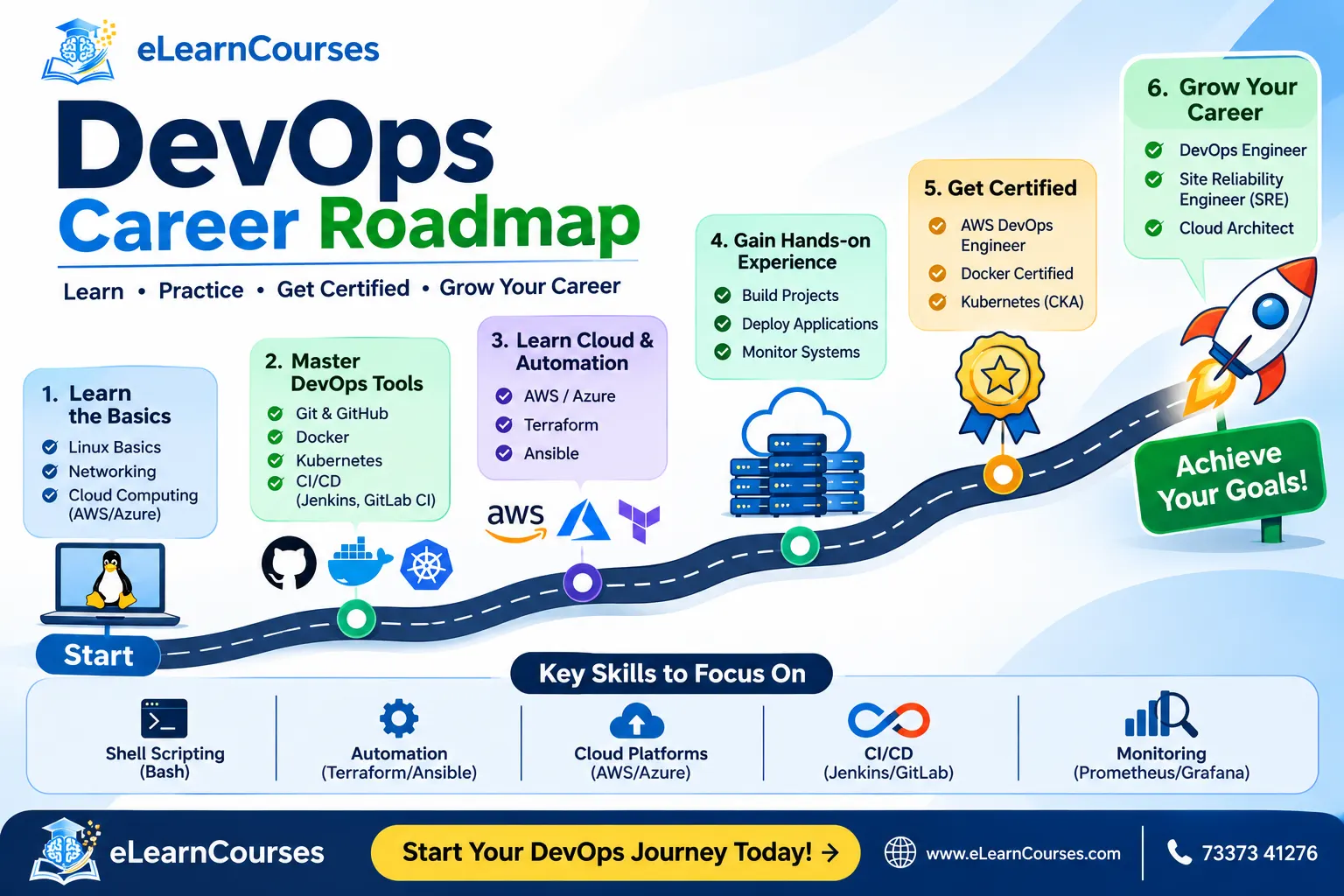
DevOps Career Roadmap: Guide for Beginners
Search for a DevOps roadmap and you’ll find a hundred diagrams with forty logos each. Docker, Jenkins, Ansible, Prometheus, ArgoCD, Vault, and so on, usually arranged so that the whole thing looks like a subway map. It’s not wrong, exactly. It’s just not much help when you’re sitting at your desk on a Monday wondering what to learn first.
The order matters more than the tool list. Tools change every couple of years, but the skills underneath them (how Linux works, how networks behave, how code gets from a laptop to production) stay put. This DevOps career roadmap walks through those skills in the sequence that makes each one easier to learn, then covers projects, certifications, timelines, and where the career can go once you’ve landed your first role.
What a DevOps engineer actually does
Strip away the job-title confusion and the work comes down to one problem: getting software from a developer’s machine into production quickly, safely, and repeatedly. A DevOps engineer builds and maintains the machinery that makes that happen. That means build and deployment pipelines, the cloud infrastructure applications run on, the monitoring that tells you when something breaks, and the automation that stops humans from doing the same manual task for the fortieth time.
On a normal day that might look like fixing a pipeline that started failing after a dependency update, writing Terraform for a new environment, tracing why a container keeps getting killed for using too much memory, or sitting in a review where developers ask why their deploy takes twelve minutes. It’s a mix of building, debugging, and talking to people. If you only want to write code in isolation, this may not be your favorite job. If you like seeing how a whole system fits together, it tends to be a good one.
One more thing worth saying early: job titles in this space are messy. Companies use DevOps Engineer, Site Reliability Engineer, Platform Engineer, Cloud Engineer, and Infrastructure Engineer for jobs that overlap heavily, and sometimes for the same job. Read the responsibilities in a posting, not the title.
Can you start in DevOps with no experience?
Yes, but be realistic about the route. Pure “day one” DevOps roles for people with zero technical background are rarer than the internet suggests, because the job assumes you already understand how systems and software behave. Most people get in from one of a few directions.
Some come from system administration or IT support, where they already know servers and troubleshooting. Some come from software development and get pulled toward deployment and infrastructure. Others start in a QA, cloud support, or junior cloud role and move sideways. And a fair number of freshers do land DevOps or cloud-associate positions directly, usually with a strong set of hands-on projects and a decent grasp of Linux.
If you’re starting from scratch, treat the first role as the goal, not the perfect title. A cloud support or junior infrastructure job that gets you near real systems is worth a lot, even if it isn’t called DevOps.
Stage 1: Linux and networking
Almost everything in DevOps runs on Linux, and most of the weird problems you’ll debug are networking problems wearing a disguise. So this is where to begin, even though it’s the least exciting part.
On the Linux side, get comfortable in a terminal. Learn the file system layout, file permissions and ownership, process management, services with systemd, package managers, and how to read logs. Learn to use grep, awk, sed, and pipes until they stop feeling like magic. Set up a Linux VM or a cheap cloud instance and break things on purpose.
On the networking side, you need the basics to be solid, not advanced. Understand IP addressing and subnets, how DNS resolution works, what happens in a TCP connection, how HTTP and HTTPS behave, and what ports, firewalls, load balancers, and proxies do. When a service can’t reach a database, you should be able to reason through where the packet might be getting stopped.
If you only do one thing in this stage, do this: take a simple web app, run it on a Linux server, put it behind Nginx, and get it serving traffic on a domain name. You’ll touch nearly everything above.
Stage 2: scripting and a bit of programming
You don’t need to be a software engineer, but you do need to automate things, and that means writing code.
Start with Bash. It’s how you’ll glue commands together on servers and in pipelines. Then pick up Python, which shows up everywhere in automation, cloud SDKs, and tooling. Learn variables, functions, loops, error handling, working with files and JSON, calling APIs, and reading someone else’s script without panicking.
Go is increasingly common in the cloud-native world (Kubernetes and Terraform are both written in it), but it’s a later addition, not a starting point. Python and Bash will carry you through your first role comfortably.
A good practice task: write a script that checks the health of a list of URLs, logs failures, and sends an alert. It’s small, it’s useful, and it shows up in real interviews in some form.
Stage 3: Git and version control
It sounds basic, but plenty of people who “know Git” only know add, commit, and push. DevOps work lives inside Git workflows, so go further. Learn branching strategies, pull requests, resolving merge conflicts, rebasing versus merging, tagging releases, and how to undo mistakes without panicking.
Also learn why teams care. Version control is the audit trail for everything: application code, pipeline definitions, infrastructure code, configuration. In a well-run team, almost nothing changes in production unless it went through a commit and a review first. That idea, called GitOps when you push it all the way, is worth understanding early.
Stage 4: pick one cloud and learn it properly
You’ll hear that you need to know AWS, Azure, and Google Cloud. You don’t, at least not at the start. Pick one and go deep, because the concepts transfer. A virtual machine, a virtual network, an identity policy, and an object store exist in all three under different names.
AWS has the largest market share and the most job postings in many regions, which makes it a reasonable default. Azure is strong in companies that already run on Microsoft. Google Cloud is popular with teams that care about Kubernetes and data. Check job listings in your own city or target market and let those decide.
Whichever you choose, cover the same ground:
- compute (virtual machines and how to size them)
- networking (VPCs or virtual networks, subnets, security groups, load balancers)
- identity and access management, which is where most security mistakes happen
- storage (object, block, and managed databases)
- a managed Kubernetes service and a serverless option, once you reach those stages
Use the free tier, and set a billing alert on day one. Everyone has a story about forgetting to shut something down.
Stage 5: CI/CD pipelines
This is the heart of the job. A CI/CD pipeline takes a code change, builds it, runs tests, packages it, and deploys it, ideally without a human clicking anything. Continuous integration means merging and testing changes frequently. Continuous delivery means that any passing change can be released safely.
Learn one tool well. GitHub Actions is the easiest to start with and widely used. GitLab CI and Jenkins are common in larger or older organizations, so skim them after you’ve got one down. Here’s a small taste of what a pipeline definition looks like in GitHub Actions:
name: build-and-test
on:
  push:
    branches: [main]
jobs:
  test:
    runs-on: ubuntu-latest
    steps:
      - uses: actions/checkout@v4
      - uses: actions/setup-python@v5
        with:
          python-version: "3.12"
      - run: pip install -r requirements.txt
      - run: pytest
Beyond syntax, learn the ideas: build once and promote the same artifact through environments, keep secrets out of the repository, cache dependencies to speed things up, and fail fast. Then learn the deployment strategies, including rolling updates, blue-green deployments, and canary releases, and when each one makes sense.
Stage 6: containers and Docker
Containers solved the old “it works on my machine” problem by packaging an application with everything it needs to run. Docker is the tool nearly everyone learns first.
Get comfortable writing a Dockerfile, building an image, running a container, mapping ports and volumes, and using Docker Compose to run a few services together. Then learn the habits that separate tutorial work from production work: small base images, multi-stage builds, running as a non-root user, and scanning images for known vulnerabilities.
Container registries (Docker Hub, Amazon ECR, GitHub Container Registry) are the next piece. Your pipeline from Stage 5 should now build an image and push it to one. That’s a real, interview-worthy milestone.
Stage 7: Kubernetes
Kubernetes is where many beginners stall, mostly because they jump in too early. If you’ve done the stages above, it makes far more sense. Kubernetes is a system for running containers across many machines, restarting them when they fail, scaling them with demand, and rolling out updates without downtime.
Start with the core objects: pods, deployments, services, config maps, secrets, and namespaces. Then move on to ingress, persistent volumes, resource requests and limits, health probes, and role-based access control. Learn Helm, since most real-world deployments use it, and get a feel for Kustomize too.
You can learn all of this on your own machine with kind or minikube, and then on a managed cluster like EKS, AKS, or GKE. The official Kubernetes documentation is genuinely good, and its tutorials are a solid practice path.
Be patient with this stage. Kubernetes has a steep learning curve, and everyone, including people who run it professionally, regularly looks things up.
Stage 8: infrastructure as code
Clicking around a cloud console doesn’t scale and can’t be reviewed. Infrastructure as code means describing servers, networks, and permissions in files, committing them to Git, and letting a tool create them. The result is repeatable, reviewable, and easy to rebuild when something goes wrong.
Terraform is the most common choice, with OpenTofu as its open-source fork. Learn providers, resources, variables, outputs, modules, and especially state, because state is where most Terraform pain lives. A simple example:
resource "aws_s3_bucket" "logs" {
  bucket = "my-team-app-logs"
}
Pair that with a configuration management tool. Ansible is the usual pick, and it’s friendly because it uses plain YAML and needs no agent on the target machines. A tidy division of labor: Terraform creates the infrastructure, Ansible configures what runs on it.
Practice by rebuilding your Stage 1 project entirely from code, so that you can destroy the whole environment and recreate it with a single command. That moment tends to make the value of the whole discipline click.
Stage 9: monitoring and observability
Shipping fast is only half the job. You also need to know when something’s wrong, ideally before a customer tells you. Observability is usually described through three kinds of signals: metrics (numbers over time), logs (events), and traces (the path of a request across services).
Prometheus and Grafana are the standard open-source pairing for metrics and dashboards. For logs, learn a stack like Loki, or Elasticsearch with Kibana. For traces, get to know OpenTelemetry, which has become the common standard for collecting telemetry. Commercial tools like Datadog and New Relic are widely used too, and the concepts carry across.
Then learn the thinking behind the tools. What’s a good alert versus a noisy one? What are service level indicators, objectives, and error budgets? How do you run an incident and write a blameless postmortem? These come from the SRE world, and Google’s free Site Reliability Engineering book is the classic reference. Alert fatigue ruins teams, so learning to alert on symptoms that matter, not on every blip, is a skill worth building deliberately.
Stage 10: security built into the pipeline
Security used to be something that happened at the end, handled by a separate team. That doesn’t work when you deploy many times a day, so the work shifted into the pipeline. This is usually called DevSecOps.
You don’t need to be a security specialist, but you should know how to handle secrets properly (tools like HashiCorp Vault, AWS Secrets Manager, or Kubernetes secrets with proper encryption), scan dependencies and container images for vulnerabilities, check infrastructure code for misconfigurations, and apply least-privilege access everywhere. Read up on the OWASP Top 10 so you understand what developers are being told to avoid.
The cheapest win for a beginner is adding a vulnerability scan and a secrets check as steps in the pipeline you already built. It takes an afternoon and looks great on a resume.
Stage 11: platform engineering, SRE, and AI-assisted operations
Once the foundations are in place, you can look at where the field is heading. A few directions are worth knowing about, even if you don’t specialize in them yet.
Platform engineering has grown quickly. Instead of every team building its own deployment setup, a platform team builds an internal developer platform with self-service tools, templates, and “golden paths” that make the right way the easy way. Backstage is a popular open-source framework here. If you enjoy building tools for other engineers, it’s an appealing track.
Site reliability engineering applies software engineering to operations, with a heavy focus on reliability targets, automation, and incident response. Cost management (often called FinOps) has also become part of the job for many teams, since cloud bills grow quietly.
And AI is showing up in operations work, from assistants that help write pipeline and infrastructure code to tools that summarize incidents and suggest causes. These are useful, but they work best in the hands of someone who understands the underlying systems. If you can’t tell whether a generated Terraform plan is about to delete your database, the tool isn’t saving you anything.
Projects that make your resume believable
Here’s the uncomfortable truth about this field: employers hire people who’ve clearly done the work. A certificate says you studied. A project says you can build. Aim for two or three solid projects instead of ten shallow ones, and put each in a public repository with a proper README that explains what it does and how to run it.
A good set might look like this:
- A small web application with a full CI/CD pipeline that tests it, builds a container image, and deploys it automatically.
- The same application running on Kubernetes in a managed cloud cluster, with the whole environment created by Terraform.
- A monitoring setup with Prometheus and Grafana dashboards, plus at least one meaningful alert and a short write-up of a failure you caused on purpose and how you diagnosed it.
That third item matters more than it sounds. Writing about a real problem you hit and solved is the thing interviewers remember. Anyone can follow a tutorial to a working deployment. Not everyone can explain why their pod kept restarting.
Certifications worth your time
Certifications help most in the early part of a career, when you don’t yet have a work history to point to. They won’t replace projects, but they can get your resume past an initial filter. A few are well regarded:
- AWS Certified Solutions Architect Associate, a common first cloud credential, and AWS Certified DevOps Engineer Professional later on
- Certified Kubernetes Administrator (CKA), which is a hands-on, performance-based exam and carries real credibility because you can’t just memorize your way through it
- HashiCorp Terraform Associate, a reasonable and affordable validation of infrastructure-as-code skills
- Microsoft’s Azure DevOps Engineer Expert or Google’s Professional Cloud DevOps Engineer, if you’re working in those ecosystems
Don’t collect them like trading cards. One cloud certification plus the CKA, backed by real projects, beats a pile of badges with nothing built behind them. Check each exam’s current requirements and prices on the provider’s site, since they change.
How long does it take?
It depends heavily on where you start and how many hours you can give. As a rough guide, someone with no IT background who studies consistently part-time might need around eight to twelve months to become interview-ready for a junior role. Someone who already works in IT support, system administration, or development can often get there in four to six months, because several stages are partly done.
Don’t treat those numbers as promises. The honest measure is whether you can build and explain the projects above without following a tutorial line by line. Here’s a loose six-month plan for someone with some technical background:
| Month | Focus | What you should be able to show |
|---|---|---|
| 1 | Linux, networking, Bash | A web app served through Nginx on a cloud VM |
| 2 | Python, Git, cloud fundamentals | A health-check script and a basic cloud network setup |
| 3 | CI/CD and Docker | A pipeline that builds and pushes a container image |
| 4 | Kubernetes | The app running on a cluster with a Helm chart |
| 5 | Terraform and Ansible | The full environment created from code |
| 6 | Monitoring, security, interview prep | Dashboards, alerts, pipeline security scans, a polished portfolio |
Stretch it if you need to. A slower pace with real practice is better than a fast skim.
Where the career goes after your first role
The first job gets you the foundations. After a couple of years, the path tends to branch, and it’s less rigid than in many other fields.
A DevOps engineer can deepen into senior DevOps work, owning larger systems and mentoring others. Some move toward site reliability engineering, where reliability targets and incident response take center stage. Some move into platform engineering, building the internal tools other developers depend on. Others specialize in cloud architecture, designing systems across many services and accounts, or in DevSecOps, focusing on security. Lateral moves into software engineering, data engineering, or security engineering are also common, since the skills overlap.
Eventually many people choose between a technical track (staff and principal engineer roles, where you set direction across teams) and a management track (team lead, engineering manager, and beyond). Neither is better. Pick the one that matches what you enjoy doing day to day.
Salaries vary a lot by country, city, company size, and specialization, so it’s more useful to check current job listings and salary reports for your own market than to trust any single number you read online.
The soft skills nobody puts on the roadmap
Technical depth gets you hired, but these decide how far you go. Communication matters because you spend a lot of time explaining problems to developers, managers, and sometimes customers. Writing is underrated: clear documentation and runbooks save your team hours and save you from being the only person who knows how something works.
Calm troubleshooting is the other big one. When production is down, the person who stays methodical, forms a hypothesis, checks it, and moves on usually beats the person who starts changing things at random. And curiosity helps, since you’ll be learning new tools for your entire career. You’re not trying to know everything. You’re trying to get good at working things out.
Common mistakes to avoid
A few traps catch a lot of beginners. Learning tools without understanding the concept behind them is the biggest one, since you end up memorizing commands you can’t adapt. Skipping Linux and networking is a close second, and it usually shows up later as a vague inability to debug anything. Chasing certifications without projects leaves you with credentials and no confidence. Trying to learn Kubernetes before Docker, or Terraform before the cloud basics, makes everything harder than it needs to be. And tutorial hopping, where you finish ten courses and build nothing of your own, feels productive and isn’t.
The fix for most of these is the same: build something small, break it, and fix it.
Frequently asked questions
Do I need to know how to code to get into DevOps?
You need scripting ability, mainly Bash and Python, but you don’t need the depth of a full-time software developer. You should be able to read code, write automation, and understand how applications are built and deployed.
Is DevOps a good career for freshers?
It can be, though the route is often indirect. Many people start in cloud support, system administration, or a junior infrastructure role, then move into DevOps. Strong projects and a solid grasp of Linux make a big difference for fresh graduates.
Which should I learn first, AWS, Azure, or Google Cloud?
Whichever appears most in the job listings you’re targeting. AWS is a common default, but the core concepts carry across providers, so the choice matters less than going deep on one.
Do I need Kubernetes to get a DevOps job?
For many roles, yes, at least at a working level. It’s not always required for a first job, but most teams use it or plan to, so it’s worth learning once you’re comfortable with Docker.
What’s the difference between DevOps, SRE, and platform engineering?
They overlap heavily. DevOps focuses on delivery speed and automation, SRE on reliability targets and incident handling, and platform engineering on building internal tools that make developers more self-sufficient. Many companies blend them.
Are certifications necessary?
Not strictly, but they help early on, especially a cloud certification and the CKA. Projects and the ability to explain your work carry more weight in interviews.
Putting the roadmap to use
The shape of the path is simple even if the tool list isn’t. Learn Linux and networking, then scripting and Git. Pick one cloud. Build pipelines, package apps in containers, run them on Kubernetes, describe the infrastructure as code, and watch it all with proper monitoring and security checks. Along the way, build real projects and write about what went wrong.
If you’d rather work through these stages with guided labs and structured practice than piece together tutorials, that’s what our DevOps and cloud courses at CourseDrill are designed for. Either way, pick the first stage you haven’t mastered and start there today. For a visual overview to keep alongside this guide, the community-maintained DevOps roadmap on roadmap.sh is a handy companion.