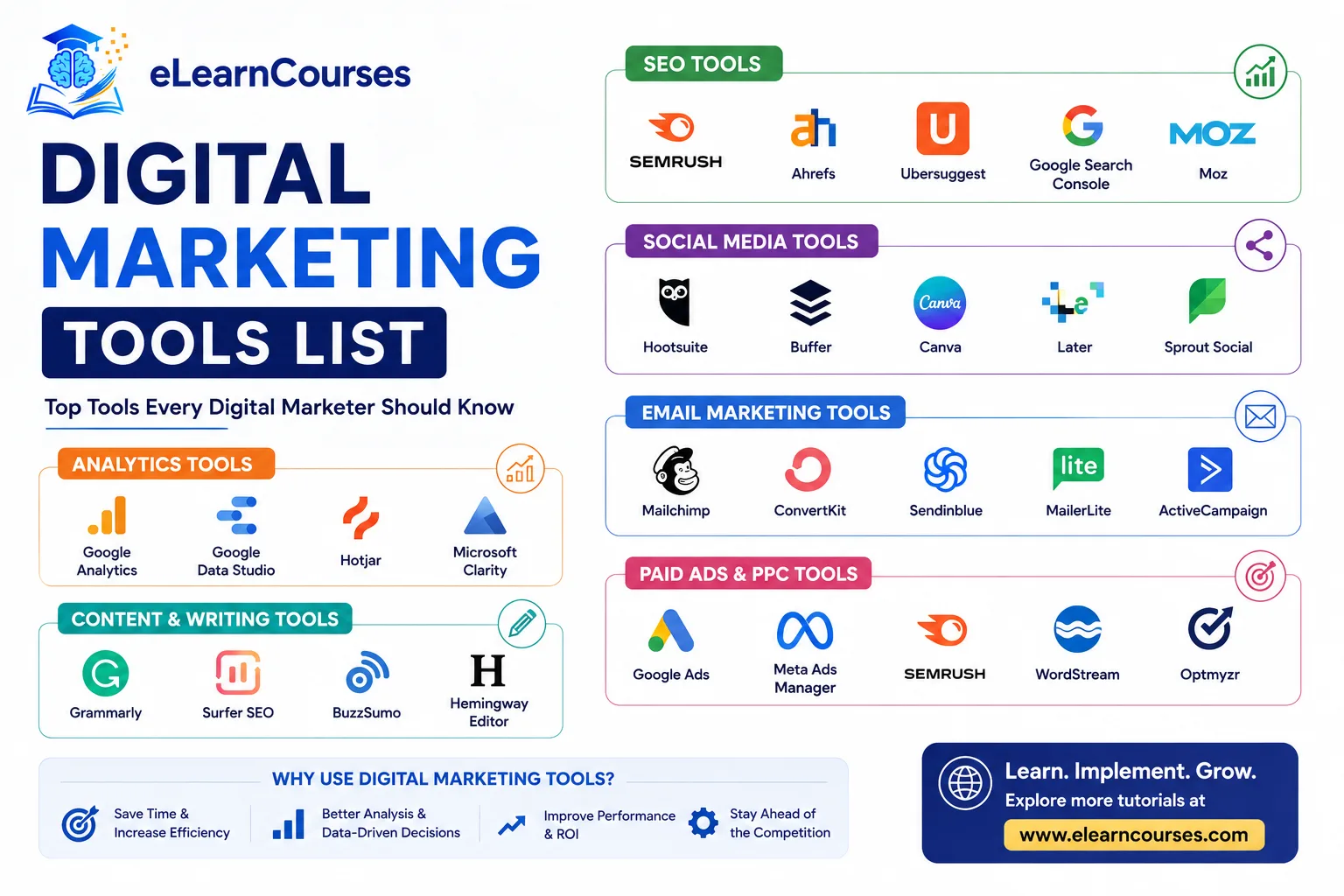
Digital Marketing Tools List (2026): The Complete Guide by Category
The average marketing team now runs somewhere between 15 and 30 different tools across SEO, content, social, email, ads, and analytics. That’s a lot to sort through, especially with a new “AI-powered” tool launching every week claiming to replace half your stack. Some of that hype is real. Most of it is repackaging.
This guide organizes the tools actually worth knowing about in 2026, category by category, so you can build a stack that fits your specific needs instead of chasing every new platform that shows up in your feed. For each category, we’ll cover the established leaders, where the free tiers are genuinely usable, and what’s changed heading into 2026 specifically.
SEO Tools
Google Search Console is free, official, and non-negotiable. It shows you exactly how Google sees your site: which queries you rank for, indexing issues, and mobile usability problems. Every other SEO tool on this list is a supplement to this one, not a replacement for it.
Ahrefs remains one of the most respected tools for backlink analysis, keyword research, and competitor site audits, with one of the largest link indexes in the industry. It’s not cheap, but for serious content and link-building strategy, it’s hard to substitute.
Semrush covers similar ground to Ahrefs, with a broader feature set that extends into PPC research, social media tracking, and content optimization, making it a common choice for teams that want one platform covering multiple channels rather than several specialized tools.
Surfer SEO focuses specifically on content optimization, analyzing top-ranking pages for a target keyword and giving writers a data-backed structure to follow. It’s become a standard part of the content workflow for teams trying to rank new articles efficiently rather than guessing at structure.
Screaming Frog crawls your site the way a search engine bot would, surfacing broken links, duplicate content, missing meta tags, and other technical issues. The free version handles up to 500 URLs, which covers most small sites without needing the paid license.
Moz Pro was one of the earlier players in this category and remains a reasonable middle-ground option between Google Search Console’s free basics and the higher price points of Ahrefs and Semrush, particularly for its Domain Authority metric, which has become an informal industry shorthand even among people who don’t use Moz directly.
AnswerThePublic visualizes the actual questions people type into search engines around a given topic, which is a genuinely useful way to find content ideas grounded in real search behavior rather than guessing what your audience wants to know.
Picking between the big paid platforms (Ahrefs, Semrush, Moz) usually comes down to which specific feature set matters most for your work: Ahrefs for backlink depth, Semrush for breadth across channels, Moz for a gentler learning curve and lower entry price. Most serious SEO practitioners eventually get hands-on experience with more than one, since agencies and in-house teams don’t all standardize on the same platform.
Content Creation and AI Writing Tools
Claude and ChatGPT have become standard first drafts for a huge share of marketing content in 2026, from blog outlines to ad copy variants. The teams getting real value from them treat the output as a starting point that gets edited by an actual person, not a finished product to publish as-is.
Jasper built its reputation specifically around marketing use cases, with brand voice training and templates aimed at repeatable content types like product descriptions and social captions. It requires more setup than a general chatbot, but that setup pays off for teams producing high volumes of on-brand content.
Grammarly checks grammar, tone, and clarity, and its business tier adds brand style guide enforcement across a whole team, useful for keeping multiple writers consistent.
Descript has become a go-to for video and podcast content specifically, letting you edit video by editing a text transcript rather than fighting with a traditional timeline editor. Given how much marketing content now includes short-form video, this has moved from a nice-to-have to a real workflow tool for lean teams.
Frase and Surfer SEO’s content editor (mentioned above under SEO tools) blur the line between content creation and optimization, generating outlines and content briefs based on what’s actually ranking for a target keyword rather than starting from a blank page.
Notion and Airtable aren’t content creation tools in the strict sense, but they’ve become the default place many marketing teams plan editorial calendars, track content status, and store brand guidelines, largely because their flexibility lets each team build a system around their own workflow rather than adapting to a rigid template.
A pattern worth keeping in mind across this entire category: the tools that generate content fastest aren’t always the ones producing the best results. Teams that get real value from AI writing tools generally use them to speed up drafting and research, then invest real editing time before anything publishes, rather than treating AI output as a finished product.
Social Media Management Tools
Hootsuite and Buffer remain the two most common starting points for scheduling and publishing across multiple platforms from a single dashboard, with Buffer generally seen as the simpler, more affordable option and Hootsuite offering deeper analytics and team collaboration features for larger organizations.
Sprout Social sits at the higher end of the market, with strong social listening and reporting features aimed at teams that need to prove ROI to leadership, not just schedule posts.
Later built its early reputation around visual content planning for Instagram specifically, and has since expanded into a broader scheduling tool, though it still tends to appeal most to visually driven brands.
Brand24 monitors mentions of your brand across social platforms, news sites, forums, and blogs, then applies sentiment analysis so you can see not just how much people are talking about you, but whether that conversation is positive or negative.
Predis.ai and similar AI content generators focused specifically on social media help produce post captions, visuals, and short-form video ideas from a rough starting concept, useful for teams that need to maintain consistent posting volume without a large dedicated content team.
Beyond scheduling and monitoring, it’s worth having at least a basic native analytics habit alongside whatever third-party tool you use. Each platform (Instagram Insights, LinkedIn Analytics, X Analytics) surfaces some data that third-party tools don’t always capture with full accuracy, particularly around reach and impressions calculated differently by each platform’s own algorithm.
Email Marketing Tools
Mailchimp remains the most common starting point for small businesses, thanks to a genuinely usable free tier and a simple drag-and-drop editor.
Klaviyo has become the default for ecommerce specifically, largely because of how deeply it integrates with Shopify and pulls purchase data directly into segmentation and automated flows.
ConvertKit targets creators and course sellers, with automation built around content delivery and audience nurturing rather than product sales.
Brevo (formerly Sendinblue) and ActiveCampaign both sit between Mailchimp’s simplicity and Klaviyo’s ecommerce depth, offering solid automation at a mid-range price point.
Choosing between these usually comes down to your business model more than raw feature comparison: ecommerce leans Klaviyo, content and courses lean ConvertKit, general small business use leans Mailchimp or Brevo. List building, segmentation, and the automated flows that drive most email revenue are worth a much deeper look than a tool comparison alone can cover.
PPC and Paid Advertising Tools
Google Ads and Meta Ads Manager are the two platforms nearly every paid strategy starts with, covering search, display, and social advertising across the two largest ad networks.
Microsoft Advertising (running on Bing and its partner network) gets overlooked by a lot of beginners, but it often has lower competition and cheaper clicks than Google Ads in the same industry, making it worth testing rather than dismissing outright.
SpyFu and Semrush’s advertising research tools let you see what keywords and ad copy competitors are actually running, which is often faster than guessing at a strategy from scratch.
AdCreative.ai generates ad creative variations for testing, useful for teams that need multiple visual and messaging directions without manually building every version by hand. It’s a starting point for concepts, not a replacement for a designer refining the strongest ones.
Optmyzr and similar PPC management platforms layer automated bid management, budget pacing, and reporting on top of the native Google Ads and Meta interfaces, aimed at agencies and larger advertisers managing many accounts or campaigns simultaneously where doing everything manually inside each platform’s native dashboard becomes impractical.
For most beginners and small businesses, the native platforms (Google Ads Manager, Meta Ads Manager) plus a competitor research tool are enough to start. Third-party management platforms earn their cost once you’re running campaigns complex or numerous enough that manual oversight inside each platform becomes a genuine time drain rather than a reasonable daily task.
Analytics and Data Tools
Google Analytics 4 (GA4) is the standard web analytics platform most marketers use to track traffic, behavior, and conversions, though its event-based data model and attribution changes have required real relearning for anyone used to the older Universal Analytics setup.
Google Tag Manager sits alongside GA4, letting you manage tracking tags and pixels across your site without needing a developer for every small change.
Looker Studio (formerly Google Data Studio) pulls data from GA4, ad platforms, and spreadsheets into shareable, customizable dashboards, and it’s free, which makes it a common choice for teams that need clean reporting without a large analytics budget.
Microsoft Clarity and Hotjar both offer session recordings and heatmaps showing exactly how visitors move through and interact with your pages. Clarity is free and has become a popular starting point specifically because of that, while Hotjar’s paid tiers add deeper survey and feedback features.
Mixpanel and Amplitude go deeper than GA4 for product-focused, event-based analytics, commonly used by SaaS and app-based businesses that need to track detailed user behavior through a signup or onboarding funnel rather than just website traffic in the aggregate.
Whatever combination you land on, the general principle worth holding onto is that a dashboard full of metrics isn’t the same thing as insight. It’s easy to end up tracking dozens of numbers without a clear sense of which ones should actually change your next decision. Picking three to five metrics tied directly to real business outcomes, and reviewing those consistently, tends to produce better decisions than a sprawling dashboard nobody actually reads closely.
Design and Creative Tools
Canva remains the fastest way for non-designers to produce social graphics, presentations, and basic marketing assets, and its AI features have expanded significantly, including background removal, text-to-image generation, and brand kit tools that keep a team’s visuals consistent.
Adobe Express and Adobe Firefly offer a similar entry point for teams already inside the Adobe ecosystem, with Firefly specifically focused on AI-generated imagery trained to avoid the copyright concerns some other image generators carry.
Figma is less of a marketing-specific tool and more the standard for actual design and prototyping work, commonly used when a marketing team is collaborating directly with designers on landing pages, ads, or product mockups.
Midjourney, DALL-E, and Stable Diffusion generate custom images from text prompts, which has changed how quickly teams can produce concept visuals, blog header images, and social graphics that would previously have required either stock photography or a dedicated illustrator. Licensing terms vary meaningfully between these tools, so it’s worth checking the specific commercial use rights before relying on any of them for client-facing or paid campaign work.
Marketing Automation and CRM Tools
HubSpot has grown into one of the broadest platforms in this list, combining CRM, email, landing pages, and marketing automation in one system, with a genuinely usable free tier that scales into a substantial investment as a business grows into its paid tiers.
ActiveCampaign covers similar automation ground with a stronger focus on behavior-based email and SMS sequences, often at a lower price point than HubSpot for teams that don’t need the full CRM suite.
Salesforce Marketing Cloud and Marketo operate at the enterprise end of this category, built for large organizations with complex, multi-team marketing operations and the budget to match.
The general pattern across this category: start with a tool that matches your current size, since migrating a full marketing automation setup later is genuinely painful. Overbuying enterprise software before you need it wastes both money and setup time you could spend on actual campaigns.
Landing Page and Conversion Tools
Unbounce and Instapage both specialize in building and testing landing pages without needing a developer, with built-in A/B testing that lets you compare page variants directly against real conversion data.
Leadpages targets a similar use case at a generally lower price point, aimed more at small businesses and solo marketers than larger teams running complex multivariate tests.
These tools matter because your landing page is often the single highest-leverage piece of a paid campaign. A great ad sending traffic to a mediocre page wastes most of what you paid for the click.
AI-Specific Marketing Tools to Watch in 2026
A distinct category of AI-native tools has emerged that doesn’t map cleanly onto the older channel-based categories above.
Answer Engine Optimization (AEO) tools are a genuinely new category in 2026, built specifically to track how and whether your brand shows up in AI-generated answers from tools like ChatGPT, Google’s AI Overviews, and AI Mode, rather than traditional blue-link search results. Semrush has added AI search tracking features, and dedicated tools have emerged specifically to monitor this newer kind of visibility.
Digital Asset Management (DAM) platforms with AI built in, like Canto, help larger teams organize, search, and control brand-consistent use of images, videos, and templates across departments, which becomes a real operational problem once a marketing org grows past a handful of people.
AI video tools like Descript, HeyGen, and Invideo have made video content production dramatically faster for teams without a dedicated video department, generating avatars, editing through text transcripts, or repurposing long-form content into short clips automatically.
The honest caveat across this entire category: tool quality varies enormously, and a lot of “AI marketing tool” positioning is marketing itself more than substance. Test on a real, low-stakes project before committing budget to an unfamiliar platform in this space.
A practical way to evaluate any new AI tool claiming to be essential for 2026: ask what specific, measurable time or cost it saves on a task you’re already doing, rather than what abstract capability it adds. Tools that pass that test tend to earn a permanent place in a stack. Tools that can’t answer it clearly tend to get abandoned within a few months once the initial novelty wears off.
Project and Workflow Management for Marketing Teams
Asana, Trello, and Monday.com aren’t marketing-specific tools, but nearly every marketing team ends up using one of them to manage campaign calendars, content pipelines, and cross-functional projects. Trello’s card-based board suits smaller, simpler workflows, while Asana and Monday.com scale better for larger teams juggling multiple concurrent campaigns with more complex dependencies.
ClickUp has gained ground as a more feature-dense alternative to all three, aiming to consolidate task management, docs, and basic time tracking into one platform, which appeals to smaller teams that want fewer separate subscriptions even if it means a steeper initial learning curve.
The right choice here depends less on marketing-specific features and more on how the rest of your organization already works. A marketing team bolted onto a company that already runs on Asana for product and engineering will generally get more value from staying on the same platform than introducing a separate tool just for marketing, even if a competitor tool has a feature or two marketing specifically would prefer.
How to Choose the Right Tools for Your Stack
With this many options in every category, a few questions help narrow things down faster than trying every free trial available.
What’s your actual bottleneck? If content production is your slowest part of the funnel, invest there first. If you’re producing plenty of content that isn’t converting, analytics and landing page tools matter more than another writing tool.
Does it integrate with what you already have? A tool that doesn’t connect to your CRM, ad accounts, or existing analytics creates manual work that quietly eats the time savings it was supposed to provide.
Can your team actually use it? The most feature-rich tool in a category is worthless if it takes three months of onboarding before anyone touches it. For small teams especially, a simpler tool that gets used consistently beats a powerful one that gets abandoned after a week.
What does it cost at your actual scale, not the entry price? A lot of these tools price low to get you in, then scale sharply with list size, seats, or usage volume. Check pricing at the size you expect to be in a year, not just where you are today.
Example Stacks by Business Type
Seeing how these tools combine in practice is often more useful than reading category descriptions in isolation.
A small ecommerce brand might run Klaviyo for email, Meta Ads Manager and Google Ads for paid acquisition, Canva for product graphics, GA4 plus Looker Studio for reporting, and Later or Buffer for social scheduling. That’s five or six tools covering the entire customer journey from discovery to repeat purchase.
A B2B SaaS company often leans more heavily on HubSpot as a combined CRM and marketing automation hub, Semrush or Ahrefs for content and SEO strategy, LinkedIn’s native ad platform alongside Google Ads, and a tool like Mixpanel for tracking product usage and onboarding funnels rather than just marketing site traffic.
A local service business (a dental practice, a law firm, a home services company) usually needs far less: Google Search Console and Google Business Profile for local search, Mailchimp’s free tier for a basic newsletter, Canva for simple graphics, and Google Ads targeted at local search terms. Most of the more advanced tools on this list genuinely aren’t worth the cost or setup time at this scale.
None of these example stacks are prescriptive. The point is that the right combination depends heavily on business model, not just company size, which is exactly why copying a competitor’s tool stack without understanding why they chose it often leads to paying for capability you don’t actually need.
Free vs. Paid: Building a Stack on a Budget
You can run a genuinely functional marketing operation almost entirely on free tools when you’re starting out. Google Search Console, GA4, Google Tag Manager, Looker Studio, Canva’s free tier, Mailchimp’s free tier, and Microsoft Clarity together cover SEO tracking, analytics, reporting, basic design, email, and user behavior insight without spending anything.
The upgrade to paid tools usually makes sense once you hit a specific limitation, not on a fixed timeline. Mailchimp’s free tier becomes limiting once your list crosses a few hundred contacts. Canva’s free tier covers most basic design needs but lacks the brand kit and advanced AI features larger teams eventually want. Treat paid upgrades as a response to a real bottleneck you’ve actually hit, not a box to check because a bigger competitor uses a fancier tool.
How to Continue Learning
Tools are only useful in service of an actual strategy, and picking the right platform matters far less than understanding the fundamentals each category is built around.
Our digital marketing tutorial covers how SEO, paid ads, social, content, and email fit together as one connected strategy rather than isolated channels, and our SEO tutorial for beginners goes deeper into the fundamentals that tools like Ahrefs and Surfer SEO are built to support. If social is a bigger part of your mix, our social media marketing guide covers platform strategy and content planning that the scheduling tools in this list are meant to execute, not replace.
FAQs About Digital Marketing Tools
What are the most important digital marketing tools for a small business just starting out? Google Search Console, Google Analytics 4, Canva, and a free-tier email platform like Mailchimp cover the essentials without any upfront cost. Add a scheduling tool like Buffer once you’re posting on social media consistently enough to need one.
Do I need paid SEO tools like Ahrefs or Semrush right away? Not necessarily. Google Search Console gives you real data about your own site for free. Paid tools like Ahrefs and Semrush become more valuable once you need competitor research and backlink analysis, which usually matters more once you’re actively trying to outrank specific competitors rather than just getting started.
Are AI marketing tools actually worth the hype in 2026? Some are, and some aren’t. Tools that speed up genuinely time-consuming tasks, like video editing or first-draft content generation, tend to deliver real value. Tools promising to fully automate strategy or replace human judgment tend to disappoint. Test on a low-stakes project before committing real budget.
What’s the difference between a CRM and a marketing automation tool? A CRM (customer relationship management system) tracks individual contact and deal data, typically used heavily by sales teams. Marketing automation tools handle email sequences, lead scoring, and campaign workflows. Many modern platforms, like HubSpot, combine both, which is part of why the line between the two categories has blurred.
How many marketing tools does a small team actually need? Fewer than you’d think. A lean, well-integrated stack of five to eight tools covering analytics, email, social, design, and SEO basics handles most small business needs. Adding tools faster than your team can actually learn and use them usually creates more overhead than value.
Should I choose an all-in-one platform or separate best-in-class tools? It depends on team size and complexity. Smaller teams often do better with an all-in-one platform like HubSpot, since it reduces the integration work between separate tools. Larger, more specialized teams often get better results from best-in-class tools per category, accepting more setup complexity in exchange for deeper functionality in each area.
How often should I re-evaluate my marketing tool stack? An annual review is a reasonable default for most small and mid-sized teams, checking whether each tool is still earning its cost and whether your actual usage matches what you’re paying for. Faster-moving categories, particularly AI-native tools, sometimes justify a more frequent look given how quickly new entrants and feature updates arrive in that specific space.
What should I do before switching from one tool to a competitor in the same category? Export your data first, always. Migrations between platforms in the same category (one email tool to another, one CRM to another) are usually more time-consuming than the marketing pages for either tool suggest, and having a clean export protects you if the migration doesn’t go as smoothly as planned.
Conclusion
The right marketing stack isn’t the one with the most tools or the newest AI features. It’s the smallest set of tools your team will actually use consistently, chosen to address real bottlenecks rather than hypothetical ones. Start with the free tools covering your core needs, upgrade to paid tools when you hit a genuine limitation, and resist the pull to add every new platform that shows up promising to fix everything at once.
The tools in this guide will keep changing, some faster than others as the AI-native category in particular continues to shake out. What won’t change is the underlying logic: pick tools that solve a problem you actually have, make sure they talk to each other, and give your team enough time to actually learn them before judging whether they’re working.